October 2026
October 15 2026
Improvements
- Web UI / Modular Analysis (MA)
- Added a safety feature that prevents MA Apps from modifying the global Python state, such as by assigning into an imported module. This protects other apps running on the shared analysis server. It applies in all environments.
- Important Note: An MA App that does this now fails to load. To fix it, update the app so it no longer changes imported modules, then redeploy it.
- When an MA App fails to load, the Logs tab now shows a short, plain-English explanation of why, along with the full traceback. For example, "App failed to load because it modifies global Python state."
- Added a safety feature that prevents MA Apps from modifying the global Python state, such as by assigning into an imported module. This protects other apps running on the shared analysis server. It applies in all environments.
Bug Fixes
- Agents: Fixed an issue where a file watcher connection ignored its configured
stable_timeand always waited 5 seconds before uploading a file. Each connection now uses its own value, whether it is set in the connection's stable time field or as astable_timeconnection variable. Connections that watch the same folder with different values no longer affect each other.
Gateway Version: 5.6.85
October 08 2026
Features
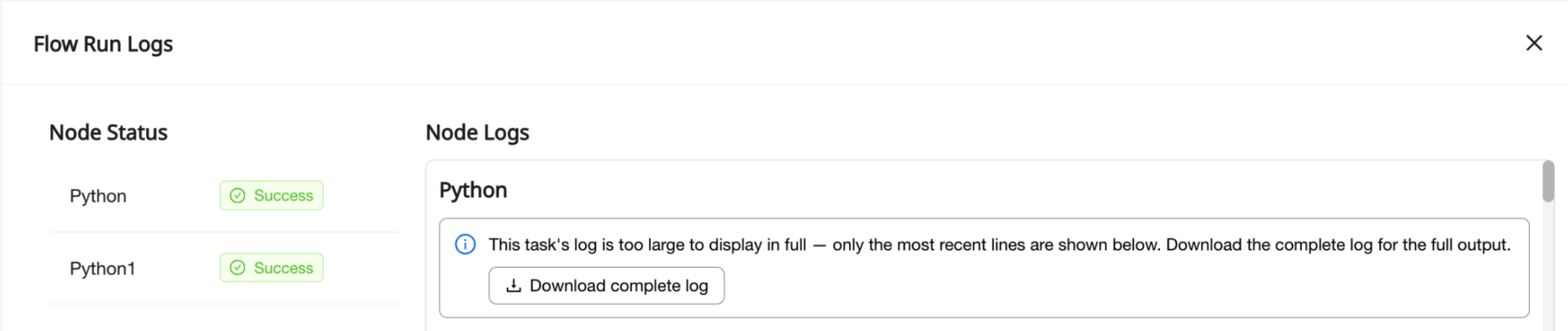
- Web UI / Flow Runs: Users can now download the complete log for a flow run step whose log is too long to show in full.
- The logs view still shows the most recent log entries, where errors usually appear, along with a Download complete log button. If a step was retried, each attempt can have its own download.
- Downloads are available for runs of flows saved or deployed after this release. For older runs, the logs view says that a full download isn't available.
Bug Fixes
- Agents: Fixed an issue where a file watcher connection could stop picking up new files while still showing as Live, until someone restarted the Host by hand.
- The Host now checks that each watched folder is still reporting changes. If one stops, the Host reconnects to it automatically and uploads any files written in the meantime.
- To run this check, the Host briefly creates a small temporary file in a watched folder that has had no activity for 10 minutes, then deletes it right away. This file is never uploaded and never triggers a flow. If the Host can't write to the folder, it uses a read-only check instead.
Gateway Version: 5.6.80
October 01 2026
Features
- Web UI / Hosts: Admins can now get email alerts when a Host's disk, CPU, or memory usage stays above a set threshold. This warns them that a Host is running out of resources before it goes offline and flows start failing.
- To set it up, turn on Send Resource Usage Alerts in Host Details, set a threshold for each metric, and choose an evaluation window (15 minutes by default). Alerts go to the same recipients as Host disconnect alerts.
- Alerts fire only when high usage is sustained, not on brief spikes. After an alert, usage must stay low for a while before the Host can alert again. Usage isn't checked while a Host is updating or offline.
- If several metrics cross their thresholds at the same time, you get one email that lists all of them.
- Web UI / Modular Analysis (MA): A new Container Health tab in the MA App viewer shows the health of the environment's shared analysis container: memory used against its limit, uptime, live sessions, and which MA Apps are mounted.
Improvements
- Web UI / Flow Runs: Flow run logs now show the most recent log entries, so the error messages and tracebacks from a failed run are visible in the UI. These usually appear at the end of the log, and long logs used to show only the earliest entries.
- If a log is too long to show in full, the logs view now says so instead of cutting it off without notice.
- API / Files:
getFilesnow supports cursor-based pagination through the new optionalcursorCreatedAtandcursorUriparameters. Very large file lists now load quickly and no longer time out on later pages.- To get the next page, pass the
createdAtanduriof the last file on the current page. Page-number pagination still works as before.
- To get the next page, pass the
Bug Fixes
- Agents
- Fixed an issue where a Host could keep showing as Live while it had stopped processing files and picking up configuration changes, until someone restarted it by hand. If a Host stops processing for 15 minutes, it now shows as disconnected and, when installed as a service, restarts itself.
- Fixed an issue where a watched network share that stopped responding could freeze a Host. That path is now reported as unhealthy, and the connection resumes on its own once the share responds again.
- Fixed an issue where a bulk metadata change on Windows, such as updating permissions or attributes across a watched folder, could re-trigger flows for files that had already been uploaded. Ganymede now checks file content and skips unchanged files, even when MD5 deduplication isn't turned on for the connection.
- Web UI / Flow Runs: Fixed an issue where opening the logs for an older flow run whose execution details had expired could show an error notification every few seconds. These runs now show no steps. When a log request fails, it's retried less often and the error is shown once instead of on every try.
Gateway Version: 5.6.78